Category Archives: Software development

Simple Validation with Data Annotations

Data Annotations are attributes which you can apply to properties in order to specify validity constraints, such as required fields, string lengths, or numeric ranges. They are quite useful to use as part of bigger frameworks such as ASP .NET MVC or WPF. This article shows very simple examples of their usage in a console application.

Adding Data Annotations

In order to add data annotations, you’ll first need to add a reference to System.ComponentModel.DataAnnotations.dll. Once that is done, add a simple class and decorate the properties with attributes from that namespace:

    public class Person
    {
        [Required]
        public string Name { get; set; }

        [Range(18, 60)]
        public int Age { get; set; }
    }

There are many predefined attributes you can use, and it is also possible to create your own by creating a class that derives from ValidationAttribute.

In this example we’re using the RequiredAttribute, which causes validation to fail if the string is null, empty, or whitespace; and the RangeAttribute, which requires a number to be within a specified range.

Property Validation

We can validate a single property on our Person object by using the Validator.TryValidateProperty() method:

        static void RunValidateProperty(string value)
        {
            var person = new Person();

            var context = new ValidationContext(person) { MemberName = "Name" };
            var results = new List<ValidationResult>();
            var valid = Validator.TryValidateProperty(value, context, results);
        }

In order to do this, we need to supply three things:

  • A ValidationContext which specifies the property to validate and the object it belongs to;
  • A collection of ValidationResult, which is a glorified error message; and
  • A value for the property that will be checked for validity.

The fact that any value can be checked for a given property makes TryValidateProperty() particularly useful to use in property setters, such as in this example.

Let’s see what happens when we try validating the Name property (remember, it’s marked as Required) with a value of null:

dataannotationsintro-required-null

In this case TryValidateProperty() returned false, and a ValidationResult was added to the results collection with the message “The Name field is required.”.

Now if we give it a valid string, it behaves quite differently:
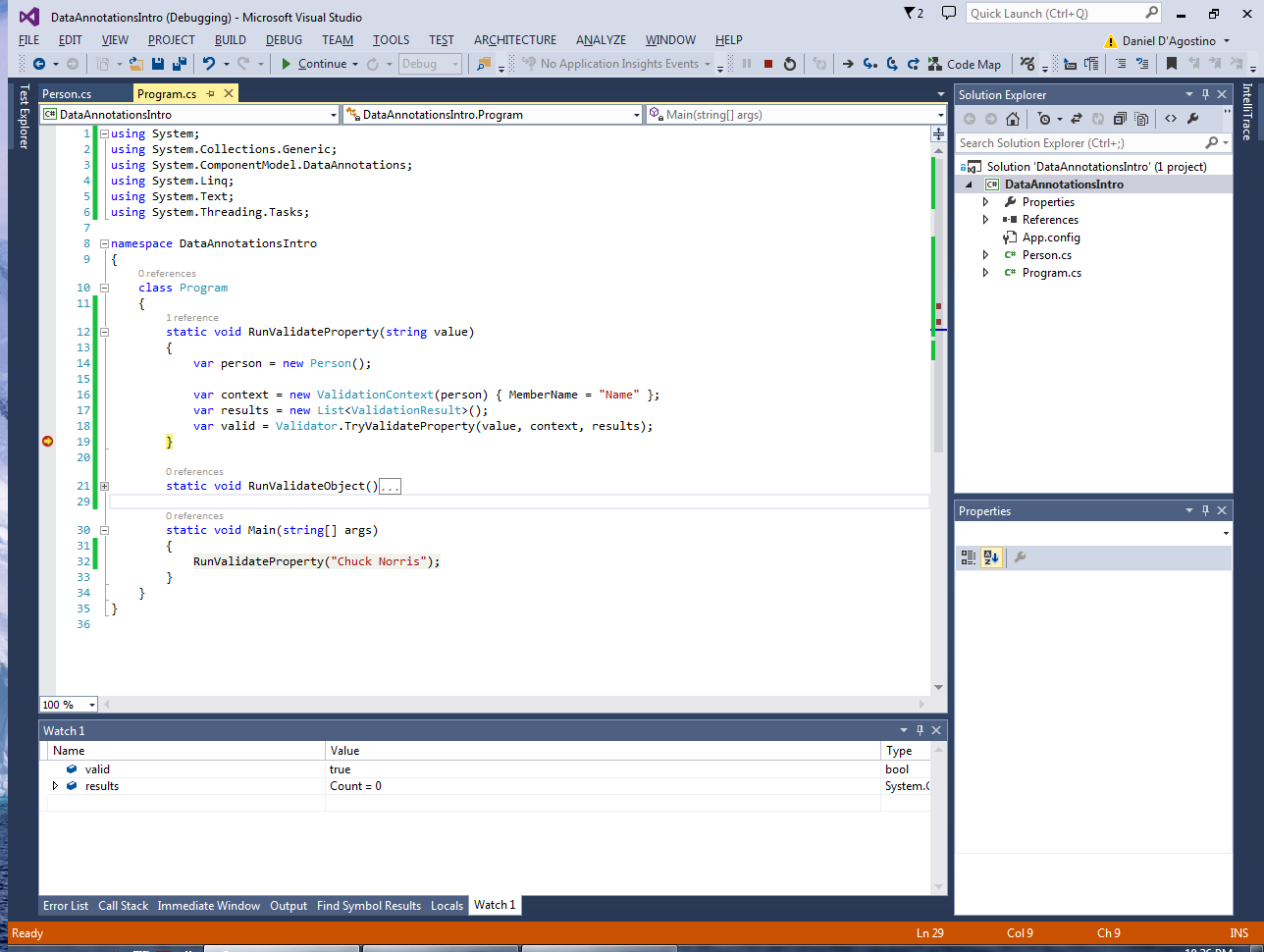
dataannotationsintro-required-valid

TryValidateProperty() returned true, and there are no ValidationResults to report.

Object Validation

While validating a single property is quite useful (e.g. while a particular field is being edited), it is often useful to validate every property in a class (e.g. when submitting data in a form).

This functionality is provided thanks to Validator.TryValidateObject():

        static void RunValidateObject()
        {
            var person = new Person();

            var context = new ValidationContext(person);
            var results = new List<ValidationResult>();
            var valid = Validator.TryValidateObject(person, context, results);
        }

Let’s try it out and see what happens:

dataannotationsintro-validateobject-requiredonly

You’ll notice that validation failed and we got a ValidationResult for the Name field. But we also have an Age property, which is supposed to be between 18 and 60, and yet it still has its default value of zero. Why didn’t that property fail validation too?

See, this happens due to an awkward default behaviour of TryValidateObject(), which by default only validates fields which are marked as Required. In order to factor in other attribute types in the validation, you need to use a different overload of TryValidateObject() which takes a boolean at the end, and set it to true:

        static void RunValidateObject()
        {
            var person = new Person();

            var context = new ValidationContext(person);
            var results = new List<ValidationResult>();
            var valid = Validator.TryValidateObject(person, context, results, true);
        }

And now, the result is much more reasonable:

dataannotationsintro-validateobject-allfields

Limitations

Using attributes for validation is a very useful concept. It allows you to simply attach metadata to properties, and let the validation logic consume those attributes when necessary.

However, data annotations also carry with them the limitations of attributes. Among these is the fact that attributes can only have static values, and so it is not possible to incorporate logic into them (e.g. to have them depend on the value of another property).

Source Code

Check out the source code for this article at the Gigi Labs BitBucket repository.

Streaming Data with ASP .NET Web API and PushContentStream

This article explains how you can subscribe to a data stream and receive data pushed spontaneously by the server, using the ASP .NET Web API. It is intended as nothing more than a learning exercise. Technologies such as WebSockets, SignalR, WCF or even plain sockets may be more suitable for this kind of thing.

Update 2015-03-14: Full source code for server and client applications is now available.

The Server

Our Web API is going to allow clients to subscribe to a service which will send the price of… something every two seconds. To start off, you will need to create a new Web project with a Web API component, and create a new controller (which I called PriceController).

Then, it is simply a matter of sending back a response whose content is a PushStreamContent:

        [HttpGet]
        public HttpResponseMessage Subscribe(HttpRequestMessage request)
        {
            var response = request.CreateResponse();
            response.Content = new PushStreamContent((a, b, c) =>
                { OnStreamAvailable(a, b, c); }, "text/event-stream");
            return response;
        }

The odd arguments in the lambda are a workaround for an unfortunate ambiguity between PushStreamContent constructors in Web API 2.

The implementation for OnStreamAvailable() is pretty simple:

        private void OnStreamAvailable(Stream stream, HttpContent content,
            TransportContext context)
        {
            var client = new StreamWriter(stream);
            clients.Add(client);
        }

We’re simply wrapping a StreamWriter around the stream, and then keeping it in a ConcurrentBag called “clients”.

The last thing we need is a timer to periodically send the price data. This is what the timer’s Elapsed event looks like:

        private async static void timer_Elapsed(object sender, ElapsedEventArgs e)
        {
            var price = 1.0 + random.NextDouble(); // random number between 1 and 2

            foreach (var client in clients)
            {
                try
                {
                    var data = string.Format("data: {0}\n\n", price);
                    await client.WriteAsync(data);
                    await client.FlushAsync();
                }
                catch(Exception)
                {
                    StreamWriter ignore;
                    clients.TryTake(out ignore);
                }
            }
        }

Every 2 seconds, a random number between 1 and 2 is selected, and is sent to all subscribed clients. The data is sent based on the format for Server-Sent Events.

If an exception occurs, then the client is effectively unsubscribed by removing it from the ConcurrentBag. This is necessary because, as Henrik Nielsen states in this discussion:

Detecting that the TCP connection has been reset is something that the Host (ASP, WCF, etc.) monitors but in .NET 4 neither ASP nor WCF tells us (the Web API layer) about it. This means that the only reliable manner to detect a broken connection is to actually write data to it. This is why we have the try/catch around the write operation in the sample. That is, responses will get cleaned up when they fail and not before.

PriceController – Full Code

All you need to get the PriceController working are the member variable declarations and the static constructor which initialises them. I’m providing the entire class below so that you can just copy it and get up and running.

    public class PriceController : ApiController
    {
        private static ConcurrentBag<StreamWriter> clients;
        private static Random random;
        private static Timer timer;

        static PriceController()
        {
            clients = new ConcurrentBag<StreamWriter>();

            timer = new Timer();
            timer.Interval = 2000;
            timer.AutoReset = true;
            timer.Elapsed += timer_Elapsed;
            timer.Start();

            random = new Random();
        }

        private async static void timer_Elapsed(object sender, ElapsedEventArgs e)
        {
            var price = 1.0 + random.NextDouble(); // random number between 1 and 2

            foreach (var client in clients)
            {
                try
                {
                    var data = string.Format("data: {0}\n\n", price);
                    await client.WriteAsync(data);
                    await client.FlushAsync();
                }
                catch(Exception)
                {
                    StreamWriter ignore;
                    clients.TryTake(out ignore);
                }
            }
        }

        [HttpGet]
        public HttpResponseMessage Subscribe(HttpRequestMessage request)
        {
            var response = request.CreateResponse();
            response.Content = new PushStreamContent((a, b, c) =>
                { OnStreamAvailable(a, b, c); }, "text/event-stream");
            return response;
        }

        private void OnStreamAvailable(Stream stream, HttpContent content,
            TransportContext context)
        {
            var client = new StreamWriter(stream);
            clients.Add(client);
        }
    }

Browser Support

To test the PriceController, you could consider firing up a browser and have it do the subscription. However, I’ve found that browser support for this is pretty crap. For instance, Firefox thinks the event stream is something you can download:

pushstreamcontent-firefox

So does IE:

pushstreamcontent-ie

Chrome actually manages to display data; however it sometimes only displays part of a message (the rest is buffered and displayed when the next message is received), and has a habit of giving up:

pushstreamcontent-chrome

When I originally saw these results, I thought I had done something seriously wrong. However, I realised this was not the case when I wrote a client in C# and found that it worked correctly. In fact, let’s do that now.

The Client

This client requires the latest Web API Client Libraries from NuGet. Since writing async Console applications can be a bit messy (see a workaround if you still want to take the Console direction), I wrote a simple WPF application. This just has a “Subscribe” button, and a TextBox which I named “OutputField”.

This is the code that does the subscription and streams the prices from the PriceController:

        private async void SubscribeButton_Click(object sender, RoutedEventArgs e)
        {
            if (this.client == null)
            {
                this.client = new HttpClient();
                var stream = await client.GetStreamAsync("http://localhost:1870/api/Price/Subscribe");

                try
                {
                    using (var reader = new StreamReader(stream))
                    {
                        while (true)
                        {
                            var line = await reader.ReadLineAsync() + Environment.NewLine;

                            this.OutputField.Text += line;
                            this.OutputField.ScrollToEnd();

                        }
                    }
                }
                catch (Exception)
                {
                    this.OutputField.Text += "Stream ended";
                }
            }
        }

Since we’re dealing with a stream, we’re using GetStreamAsync() to talk to the Web API rather than the usual GetAsync(). Then, we can read it as we would any other stream.

And in fact, it works pretty nicely:

pushstreamcontent-wpfclient

Related Links

VS2015 Preview: Inline Temporary Variable

Visual Studio 2015 brings two new refactorings: Introduce Local Variable, and Inline Temporary Variable.

Inline Temporary Variable is actually the exact opposite of Introduce Local Variable. At times you’ll be using a variable for something so simple that it actually clutters the code. For example:

var firstArgument = args[0];
Console.WriteLine(firstArgument);

We can get rid of the firstArgument variable by using the Inline Temporary Variable refactoring.

To do this, we first need to select the firstArgument variable on the first line (where it is being declared), and then press Ctrl+. (Control Dot) or select “Quick Actions…” from the context menu after right-clicking the selection. This brings up the refactorings menu, from which we can select the refactoring we want:

vs2015-inline-temporary-variable

After selecting the Inline Temporary Variable refactoring from the menu, the code gets cleaned up pretty nicely:

Console.WriteLine(args[0]);


VS2015 Preview: Introduce Local Variable

There are two new refactorings introduced in Visual Studio 2015. The first of these allows you to introduce a local variable to simplify your code. Let’s see this at work on some source code from ImapTalk.

After selecting some code, press Ctrl+. (Control Dot) or select “Quick Actions…” after right-clicking on the selected code. You’ll get a list of refactorings that you can apply to your code, along with a nifty preview of what your code will look like after it is applied:

vs2015-introduce-variable-preview

In this code I’ve got this Color object that I’m passing directly into the constructor of a SolidColorBrush, which looks a bit messy. With this refactoring, I’ll introduce a local variable to hold that Color, and then pass the new variable into the SolidColorBrush:

vs2015-introduce-variable-renameOnce you select this refactoring, Visual Studio goes into inline rename mode, so that you can choose the name of the new variable.

Take a look at the refactored code above. Much better! 🙂

On Cooking Software and Waterfalls

I’ve recently been following a discussion about Agile software development on LinkedIn. While there were some interesting points raised and also many pointless posts, there was one entry in particular that I found particularly interesting.

I am reproducing the post by Peter Wennerholm below with his permission, and have added my own commentary in between block quotes.

“Several contributors seem to see only two alternatives to how to produce software: Agile and Waterfall.

“That is not a fair view of the situation: waterfall was presented as a process that should NOT be used for software development. So far I have never heard of any shop that uses it, and that’s a good thing too.

“Let us chew on that for a while. The waterfall process was never intended to be used for software development. It was put forward as a process that should be avoided. So unless you really have found yourself in a pure waterfall team (and then you have my sympathies) please stop putting it forward as an alternative to Agile. The Agile “procedure” must be judged on its own merits, not as a contrast to an absurdity.”

Some interesting insight on the Waterfall model here! The paper [PDF] linked by Mr. Wennerholm, which dates back to 1970, describing what we now know as the waterfall model while clearly indicating (a) why it is not suitable for large software development projects, and (b) a number of improvements that make the Waterfall model a lot more reasonable to use. If you’re too lazy to read the paper itself, this blog post contains some pretty decent commentary about it.

“I have always made software in much the same way as how I cook: you add some ingredients, then taste, then add some more, taste again, etc. If you want to give it a fancy name, be my guest, but it seems more like common sense to me. Oh well… If someone can make money teaching common sense to programmers, who am I to deprive him of his living?”

I think that the cooking metaphor used by Mr. Wennerholm is pretty spot on. It is in the spirit of prototyping (which is at the heart of many agile practices) to create something small, see that you’re going in the right direction, and then continue with the next iteration, as opposed to building the whole thing and then realising you’re totally off track. The simplicity of the process is also worth noting. While software development may be as simple as a feedback loop, today there are many different methodologies involving piles of documents, meetings and ceremonies. While these are often useful if done right, it is not hard to realise that they are well hyped up by the people making a living from promoting them (e.g. by writing books) and by those who religiously think they’re a panacea.

“The problems seem to arise when people trained in managing non-programmers are put to manage programmers. The “common sense” is a double-edged sword: your life experience will dictate what is common sense to you, and it may differ very much from what is common sense to me. A non-software person tends to see a project as a collection of known problems with known solutions: it takes X seconds to lay one brick, the wall is Y long, so it will take Z days to finish the wall. A programmer knows that there are many unknown variables in his project: it is a collection of problems out of which some may be completely new, or handled by new tools, or in an unknown environment, or with unknown people. We cannot say how long it will take to finish the wall; when we start we do not even know if we should use bricks. Therefore, common sense dictates to make tiny waterfalls, or cycles, where each cycle takes us one step further towards completion and gives us more knowledge about the problems ahead of us. Agile and Scrum to you, perhaps.”

In this paragraph we recognise the fact that there are many unknowns in software development. When undertaking something new, we are often unfamiliar with the business, the technology, and many other aspects which can seriously affect the outcome of the project.

In my opinion it is pure madness to commit to strict deadlines on something that is very poorly understood. Therefore, the first thing that should be done is to make the effort to investigate the unknown factors so that they are at least fairly understood. This should be done as early as possible.

Aside from learning by communicating with the client, prototyping also helps a lot with understanding the problem domain. I believe this is what Mr. Wennerholm means when he mentions making tiny waterfalls. This is also reflected in the aforementioned paper, where Dr. Royce suggests creating the software twice: once as a small-scale throwaway prototype to capture the problem domain without wasting too much effort, and the second time as the actual deliverable.

“When we talk about what is the best way of programming, let us all be very humble. Our profession is so young that some of the very first programmers are still alive today. Look at house building: after thousands of years of experience we still have houses that burn or collapse or rot – we cannot claim to have all the answers on how to build software.”

I don’t think this paragraph requires much commentary: I think it is a pretty awesome message that we have so much to learn. Let’s try not to be religious about anything in software development; tomorrow someone may demonstrate that the awesome technique we touted so valiantly is actually a pretty bad practice. And when that happens, I hope we are open-minded enough to learn from our mistakes and grow in our beloved profession.