Category Archives: Software development

RabbitMQ String Headers Received As Byte Arrays

I ran into a strange issue today with RabbitMQ. When adding custom headers, I found that things like integers would get through to the other end just fine. But when it came to strings, they ended up as byte arrays in the receiving end.

To illustrate this issue, I’ve written a very simple example. The publisher, below, sets two custom headers: a string and an integer:

        static void Main(string[] args)
        {
            Console.Title = "Publisher";

            var factory = new ConnectionFactory();

            using (var connection = factory.CreateConnection())
            {
                using (var channel = connection.CreateModel())
                {
                    // prepare payload and headers

                    var body = Encoding.UTF8.GetBytes("Hello");
                    var props = channel.CreateBasicProperties();
                    props.Headers = new Dictionary<string, object>();
                    props.Headers["Name"] = "Bob";
                    props.Headers["Age"] = 21;

                    // set up queue and exchange

                    channel.QueueDeclare("testqueue", true, false, false, null);
                    channel.ExchangeDeclare("testexchange", "direct");
                    channel.QueueBind("testqueue", "testexchange", "");

                    // publish message

                    channel.BasicPublish("testexchange", "", props, body);

                    Console.ReadLine();
                }
            }
        }

As you can see, this is set correctly in the Headers collection:

rabbitmq-quirkystring-publish-debug

Now that we’ve published a message, we can consume it using the following code (practically the same as that in “Getting Started with RabbitMQ with .NET“, except that it also writes out the two custom headers):

        static void Main(string[] args)
        {
            Console.Title = "Consumer";

            var factory = new ConnectionFactory();

            using (var connection = factory.CreateConnection())
            {
                using (var channel = connection.CreateModel())
                {
                    channel.QueueDeclare("testqueue", true, false, false, null);

                    var consumer = new EventingBasicConsumer(channel);
                    consumer.Received += Consumer_Received;
                    channel.BasicConsume("testqueue", true, consumer);

                    Console.ReadLine();
                }
            }
        }

        private static void Consumer_Received(object sender, BasicDeliverEventArgs e)
        {
            var body = e.Body;
            var content = Encoding.UTF8.GetString(body);
            var name = e.BasicProperties.Headers["Name"];
            var age = e.BasicProperties.Headers["Age"];

            Console.WriteLine("{0} {1} {2}", name, age, content);
        }

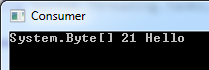
The output, however, is not quite what one would expect:

rabbitmq-quirkystring-bytearray-output

In fact, what we received in the consumer is not a string but a byte array, even if the bytes correspond to what we actually sent:

rabbitmq-quirkystring-consume-debug

The integer header, however, did not have this problem.

A quick search showed that I’m not the first person to encounter this, as someone pointed out this odd behaviour back in 2012, and it appears there’s a similar issue in the Python implementation.

All I can suggest based on these two links is: if you have a header which you know is a string, just do the byte-to-string conversion yourself:

        private static void Consumer_Received(object sender, BasicDeliverEventArgs e)
        {
            var body = e.Body;
            var content = Encoding.UTF8.GetString(body);
            var nameBytes = (byte[]) e.BasicProperties.Headers["Name"];
            var name = Encoding.UTF8.GetString(nameBytes);
            var age = e.BasicProperties.Headers["Age"];

            Console.WriteLine("{0} {1} {2}", name, age, content);
        }

As you would expect, this sorts out the problem:

rabbitmq-quirkystring-string-output

How to use the C++ STL Priority Queue

This article was originally posted at Gigi’s Computer Corner on 19th January 2013.

Overview

A priority queue is a queue data structure that has the particular property of being sorted by priority. You can decide what priority to give items depending on the data type – more on this in a minute.

The C++ Standard Template Library (STL) includes a convenient std::priority_queue class template in the queue header file.

A simple priority queue of integers

The following code sample illustrates how to implement a priority queue of integers. The integer value is used by default as a priority. The queue is sorted automatically as new entries are added.

#include <iostream>
#include <queue>

int main(int argc, char ** argv)
{
	std::priority_queue<int> queue;

	queue.push(100);
	queue.push(300);
	queue.push(50);
	queue.push(150);

	while (!queue.empty())
	{
		std::cout << queue.top() << std::endl;
		queue.pop();
	}

	system("pause");

	return 0;
}

The output of the above program is as follows:

300
150
100
50
Press any key to continue . . .

A priority queue with a custom class

In practical situations, it is often not very useful to simply maintain a priority queue of just integers. We often have some particular class, and we want to give each instance a priority (computed based on some internal state).

Let’s say we have a class called Toast, composed of a certain amount of bread and butter:

class Toast
{
public:
	int bread;
	int butter;

	Toast(int bread, int butter)
		: bread(bread), butter(butter)
	{

	}
};

It is easy to sort integers, but how do you sort Toast? We need to offer C++ a way to compare one Toast instance to another. This is done by creating a structure implementing an operator() and effectively doing a less-than comparison. A StackOverflow question and answer shows how it’s done, and the code needed for sorting our Toast is below.

struct ToastCompare
{
	bool operator()(const Toast &t1, const Toast &t2) const
	{
		int t1value = t1.bread * 1000 + t1.butter;
		int t2value = t2.bread * 1000 + t2.butter;
		return t1value < t2value;
	}
};

We can now pass the TestCompare class to the priority_queue to tell it how to sort the Toast. Sample code is below.

#include <iostream>
#include <queue>
#include <vector>

#include "Toast.h"

using std::priority_queue;
using std::vector;
using std::cout;
using std::endl;

int main(int argc, char ** argv)
{
	Toast toast1(2, 200);
	Toast toast2(1, 30);
	Toast toast3(1, 10);
	Toast toast4(3, 1);
	
	//priority_queue<Toast> queue;
	priority_queue<Toast, vector<Toast>, ToastCompare> queue;

	queue.push(toast1);
	queue.push(toast2);
	queue.push(toast3);
	queue.push(toast4);

	while (!queue.empty())
	{
		Toast t = queue.top();
		cout << "bread " << t.bread << " butter " << t.butter << std::endl;
		queue.pop();
	}

	system("pause");

	return 0;
}

If we used the simple priority_queue declaration (the line that is commented out), we would end up with a bunch of errors because of C++ not knowing how to compare theToast instances.

Instead, we pass three template arguments: the Toast itself, a vector of Toast, and theToastCompare class to tell C++ how to compare Toast instances. The second template argument (the vector) is there because the C++ STL priority queue is actually a container adapter – it uses an underlying data structure to store elements, and the default is a vector.

The output for the above program is given below:

bread 3 butter 1
bread 2 butter 200
bread 1 butter 30
bread 1 butter 10
Press any key to continue . . .

Further reading

Scope Bound Resource Management in C#

This article explains how we can use scope to localize resource lifetime as well as other arbitrary user code effects within a method. The article starts with background from C++, because that’s where this technique comes from.

Update 5th November 2016: Some of the utility classes described here have been incorporated in my Dandago.Utilities NuGet package.

The RAII Pattern

Despite their power, pointers in C/C++ have been the cause of much outrage. Using them incorrectly typically leads to disastrous effects, from memory leaks to segmentation faults. While newer languages such as Java and C# have imposed damage control by taking control of the lifetime of objects allocated on the heap (via garbage collection), there are techniques even in C++ that make pointers a lot less messy to use.

In fact, the problem here is not even about pointers. Pointers belong to a family of resources, along with file handles, sockets, and many other things. These are typically allocated on the heap and must be released after use; otherwise bad things happen.

Scott Meyers’ excellent book Effective C++: 55 Specific Ways to Improve Your Programs and Designs has an entire section dedicated to safely working with resources. One of the first things he suggests in that section is to encapsulate a resource within an object. For example:

class MyResource
{
public:
    MyResource() // constructor
    {
        this->ptr = new int[1000]; // allocate memory on heap
    }

    ~MyResource() // destructor
    {
        delete[] this->ptr; // free memory
    }

private:
    int * ptr; // pointer encapsulated within class
};

This encapsulation is called Resource Acquisition Is Initialization (RAII), or Scope-Bound Resource Management. Apart from constructors, C++ classes can have destructors. These get called either explicitly from application code, or automatically when an object allocated on the stack goes out of scope. Let’s see how this works in practice:

int main(int argc, char ** argv)
{
    // create instance of MyResource on stack
    MyResource resource;

    return 0;
} // we went out of scope; destructor gets called

Just like declaring an int variable allocates it on the stack, the same thing happens with class types. When that object goes out of scope (i.e. reaches the next } brace), its destructor gets called. This is great because you can’t really forget to dispose of the encapsulated resource. If you return early, throw an exception, etc, the destructor will get called when control leaves the current execution block.

The IDisposable Pattern

In C#, objects allocated on the heap (via the new keyword) are typically killed by the garbage collector when it determines that they are no longer in use. While C# code typically doesn’t face the problems C++ code has with pointers, managing resources is no less important. Just like C++, C# has to deal with file handles, databases, sockets, unmanaged libraries and other stuff that must be disposed as carefully as they are initialized.

For this reason, C# provides two tools to essentially do the work of C++ destructors: the IDisposable pattern, and finalizers. Using these correctly is non-trivial and depends on the situation, but they are also pretty standard and well-documented. Check out this CodeProject article for an in-depth treatment of the topic.

For convenience, C# also provides an overloaded using keyword that works hand-in-hand with the IDisposable pattern:

            using (var fs = File.OpenWrite("file.txt"))
            using (var sw = new StreamWriter(fs))
            {
                sw.WriteLine("Hello!");
            } // automatically calls Dispose() for both

A using block, wrapping an object that implements IDisposable, will automatically call that object’s Dispose() method when it goes out of scope (and using blocks can be stacked, as above). This is essentially equivapent to:

            FileStream fs = null;
            StreamWriter sw = null;
            try
            {
                fs = File.OpenWrite("file.txt");
                sw = new StreamWriter(fs);

                sw.WriteLine("Hello!");
            }
            finally
            {
                sw.Dispose();
                fs.Dispose();
            }

Abusing the IDisposable Pattern

While IDisposable is meant to be used to safely dispose of resources, we can extend its usefulness to other scenarios that relate to a particular scope.

One example where I’ve used this idea before is to log the beginning and end of a method:

    public class ScopedLog : IDisposable
    {
        private string name;

        public ScopedLog(string name)
        {
            this.name = name;
            Console.WriteLine("Begin {0}", name);
        }

        public void Dispose()
        {
            Console.WriteLine("End {0}", this.name);
        }
    }

This pattern doesn’t really add anything, but gives you an elegant way to do scope-related stuff without that getting in the way of your application logic:

        static void Main(string[] args)
        {
            using (var log = new ScopedLog("Main"))
            {
                Console.WriteLine("Hello!");
            }

            Console.ReadLine();
        }

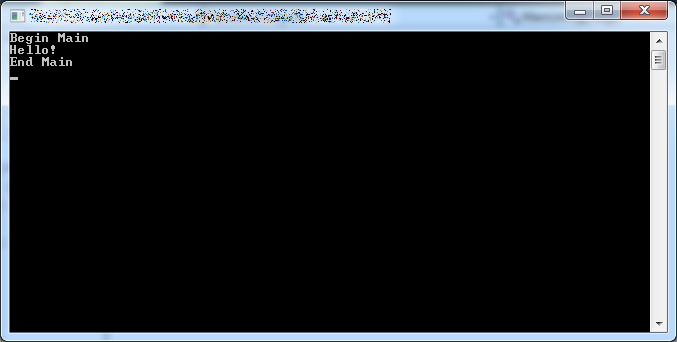
Here’s the output:

scope-logging

Another example is when you want to benchmark your code. Code can get really messy when you’re doing logging, benchmarking and other stuff in the same method. Instead, we can make a dedicated class:

    public class ScopedTimer : IDisposable
    {
        private string name;
        private DateTime startTime;

        public ScopedTimer(string name)
        {
            this.name = name;
            this.startTime = DateTime.Now;
        }

        public void Dispose()
        {
            var endTime = DateTime.Now;
            var elapsed = endTime - this.startTime;

            Console.WriteLine("{0} took {1}", this.name, elapsed);
        }
    }

…and then put it neatly in a using block:

        static void Main(string[] args)
        {
            using (var timer = new ScopedTimer("Main"))
            using (var log = new ScopedLog("Main"))
            {
                Console.WriteLine("Hello!");
            }

            Console.ReadLine();
        }

Here’s the output:

scope-benchmarking

A final example is changing the console colour. It’s very easy to save the old colour, set a new one, and then revert back to the old colour when going out of scope:

    public class ScopedConsoleColour : IDisposable
    {
        private ConsoleColor oldColour;

        public ScopedConsoleColour(ConsoleColor newColour)
        {
            this.oldColour = Console.ForegroundColor;

            Console.ForegroundColor = newColour;
        }

        public void Dispose()
        {
            Console.ForegroundColor = this.oldColour;
        }
    }

Note: you could use Console.ResetColor(), but then you can’t nest colour changes.

Here’s the updated Main() code for this example:

        static void Main(string[] args)
        {
            using (var timer = new ScopedTimer("Main"))
            using (var log = new ScopedLog("Main"))
            {
                Console.WriteLine("Hello!");

                using (var colour = new ScopedConsoleColour(ConsoleColor.Yellow))
                {
                    Console.WriteLine("Howdy?");
                }

                Console.WriteLine("Bye!");
            }

            Console.ReadLine();
        }

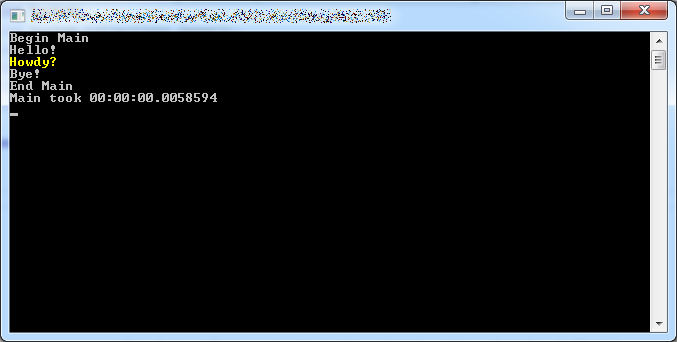
Here’s the output:

scope-colour

Other Applications in C++

The RAII pattern is awesome. Not only does it allow you to safely manage the lifetime of resources, but it enables a whole class of scope-based applications. Aside from the C# examples in the previous section, RAII enables things like smart pointers in C++ (e.g. unique_ptr) and scoped locks.

A Multilevel Cache Retrieval Design for .NET

Caching data is vital for high-performance web applications. However, cache retrieval code can get messy and hard to test without the proper abstractions. In this article, we’ll start an ugly multilevel cache and progressively refine it into something maintainable and testable.

The source code for this article is available at the Gigi Labs BitBucket repository.

Naïve Multilevel Cache Retrieval

A multilevel cache is just a collection of separate caches, listed in order of speed. We typically try to retrieve from the fastest cache first, and failing that, we try the second fastest; and so on.

For the example in this article we’ll use a simple two-level cache where:

We’re going to build a Web API method that retrieves a list of supported languages. We’ll prepare this data in Redis (e.g. using the command SADD languages en mt) but will leave the MemoryCache empty (so it will have to fall back to the Redis cache).

A simple implementation looks something like this:

    public class LanguagesController : ApiController
    {
        // GET api/languages
        public async Task<IEnumerable<string>> GetAsync()
        {
            // retrieve from MemoryCache

            var valueObj = MemoryCache.Default.Get("languages");

            if (valueObj != null)
                return valueObj as List<string>;
            else
            {
                // retrieve from Redis

                var conn = await ConnectionMultiplexer.ConnectAsync("localhost:6379");
                var db = conn.GetDatabase(0);
                var redisSet = await db.SetMembersAsync("languages");

                if (redisSet == null)
                    return null;
                else
                    return redisSet.Select(item => item.ToString()).ToList();
            }
        }
    }

Note: this is not the best way to create a Redis client connection, but is presented this way for the sake of simplicity.

Data Access Repositories and Multilevel Cache Abstraction

The controller method in the previous section is having to deal with cache fallback logic as well as data access logic that isn’t really its job (see Single Responsibility Principle). This results in bloated controllers, especially if we add additional cache levels (e.g. fall back to database for third-level cache).

To alleviate this, the first thing we should do is move data access logic into repositories (this is called the Repository pattern). So for MemoryCache we do this:

    public class MemoryCacheRepository : IMemoryCacheRepository
    {
        public Task<List<string>> GetLanguagesAsync()
        {
            var valueObj = MemoryCache.Default.Get("languages");
            var value = valueObj as List<string>;
            return Task.FromResult(value);
        }
    }

…and for Redis we have this instead:

    public class RedisCacheRepository : IRedisCacheRepository
    {
        public async Task<List<string>> GetLanguagesAsync()
        {
            var conn = await ConnectionMultiplexer.ConnectAsync("localhost:6379");
            var db = conn.GetDatabase(0);
            var redisSet = await db.SetMembersAsync("languages");

            if (redisSet == null)
                return null;
            else
                return redisSet.Select(item => item.ToString()).ToList();
        }
    }

The repositories each implement their own interfaces, to prepare for dependency injection which is one of our end goals (we’ll get to that later):

    public interface IMemoryCacheRepository
    {
        Task<List<string>> GetLanguagesAsync();
    }

    public interface IRedisCacheRepository
    {
        Task<List<string>> GetLanguagesAsync();
    }

For this simple example, the interfaces look almost identical. If your caches are going to be identical then you can take this article further and simplify things even more. However, I’m not assuming that this is true in general; you might not want to have a multilevel cache everywhere.

Let’s also add a new class to abstract the fallback logic:

    public class MultiLevelCache
    {
        public async Task<T> GetAsync<T>(params Task<T>[] tasks) where T : class
        {
            foreach(var task in tasks)
            {
                var retrievedValue = await task;

                if (retrievedValue != null)
                    return retrievedValue;
            }

            return null;
        }
    }

Basically this allows us to pass in a number of tasks, each corresponding to a cache lookup. Whenever a cache lookup returns null, we know it’s a cache miss, which is why we need the where T : class restriction. In that case we try the next cache level, until we finally run out of options and just return null to the calling code.

This class is async-only to encourage asynchronous retrieval where possible. Synchronous retrieval can use Task.FromResult() (as the MemoryCache retrieval shown earlier does) to conform with this interface.

We can now refactor our controller method into something much simpler:

        public async Task<IEnumerable<string>> GetAsync()
        {
            var memoryCacheRepository = new MemoryCacheRepository();
            var redisCacheRepository = new RedisCacheRepository();
            var cache = new MultiLevelCache();

            var languages = await cache.GetAsync(
                memoryCacheRepository.GetLanguagesAsync(),
                redisCacheRepository.GetLanguagesAsync()
            );

            return languages;
        }

The variable declarations will go away once we introduce dependency injection.

Multilevel Cache Repository

The code looks a lot neater now, but it is still not testable. We’re still technically calling cache retrieval logic from the controller. A cache depends on external resources (e.g. databases) and also potentially on time (if expiry is used), and that’s not good for unit tests.

A cache is not very different from the more tangible data sources (such as Redis or a database). With them it shares the function of retrieving data and the nature of relying on resources external to the application, which makes it incompatible with unit testing. A multilevel cache has the additional property that it is an abstraction for the underlying data sources, and is thus itself a good candidate for the repository pattern:

multilevel-cache-repository

We can now move all our cache retrieval logic into a new MultiLevelCacheRepository class:

    public class MultiLevelCacheRepository : IMultiLevelCacheRepository
    {
        public async Task<List<string>> GetLanguagesAsync()
        {
            var memoryCacheRepository = new MemoryCacheRepository();
            var redisCacheRepository = new RedisCacheRepository();
            var cache = new MultiLevelCache();

            var languages = await cache.GetAsync(
                memoryCacheRepository.GetLanguagesAsync(),
                redisCacheRepository.GetLanguagesAsync()
            );

            return languages;
        }
    }

Our controller now needs only talk to this repository, and carry out any necessary logic after retrieval (in this case we don’t have any):

        public async Task<IEnumerable<string>> GetAsync()
        {
            var repo = new MultiLevelCacheRepository();
            var languages = await repo.GetLanguagesAsync();
            return languages;
        }

Dependency Injection

Our end goal is to be able to write unit tests for our controller methods. A prerequisite for that is to introduce dependency injection.

Follow the instructions in “ASP .NET Web API Dependency Injection with Ninject” to set up Ninject, or use any other dependency injection framework you prefer.

In your dependency injection configuration class (NinjectWebCommon if you’re using Ninject), set up the classes and interfaces you need:

        private static void RegisterServices(IKernel kernel)
        {
            kernel.Bind<IMemoryCacheRepository>().To<MemoryCacheRepository>()
                .InSingletonScope();
            kernel.Bind<IRedisCacheRepository>().To<RedisCacheRepository>()
                .InSingletonScope();
            kernel.Bind<IMultiLevelCacheRepository>().To<MultiLevelCacheRepository>()
                .InSingletonScope();
            kernel.Bind<MultiLevelCache>().To<MultiLevelCache>()
                .InSingletonScope();
        }

Note: you can also set up an interface for MultiLevelCache if you want. I didn’t do that out of pure laziness.

Next, refactor MultiLevelCacheRepository to get the classes it needs via constructor injection:

    public class MultiLevelCacheRepository : IMultiLevelCacheRepository
    {
        private IMemoryCacheRepository memoryCacheRepository;
        private IRedisCacheRepository redisCacheRepository;
        private MultiLevelCache cache;

        public MultiLevelCacheRepository(
            IMemoryCacheRepository memoryCacheRepository,
            IRedisCacheRepository redisCacheRepository,
            MultiLevelCache cache)
        {
            this.memoryCacheRepository = memoryCacheRepository;
            this.redisCacheRepository = redisCacheRepository;
            this.cache = cache;
        }

        public async Task<List<string>> GetLanguagesAsync()
        {
            var languages = await cache.GetAsync(
                memoryCacheRepository.GetLanguagesAsync(),
                redisCacheRepository.GetLanguagesAsync()
            );

            return languages;
        }
    }

Do the same with the controller:

    public class LanguagesController : ApiController
    {
        private IMultiLevelCacheRepository repo;

        public LanguagesController(IMultiLevelCacheRepository repo)
        {
            this.repo = repo;
        }

        // GET api/languages
        public async Task<IEnumerable<string>> GetAsync()
        {
            var languages = await repo.GetLanguagesAsync();
            return languages;
        }
    }

…and make sure it actually works:
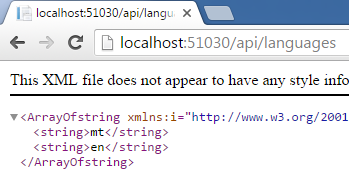
multilevel-cache-verify

Unit Test

Thanks to this design, we can now write unit tests. There is not much to test for this simple example, but we can write a simple (!) test to verify that the languages are indeed retrieved and returned:

        [TestMethod]
        public async Task GetLanguagesAsync_LanguagesAvailable_Returned()
        {
            // arrange

            var languagesList = new List<string>() { "mt", "en" };

            var memCacheRepo = new Mock<MemoryCacheRepository>();
            var redisRepo = new Mock<RedisCacheRepository>();
            var cache = new MultiLevelCache();
            var multiLevelCacheRepo = new MultiLevelCacheRepository(
                memCacheRepo.Object, redisRepo.Object, cache);
            var controller = new LanguagesController(multiLevelCacheRepo);

            memCacheRepo.Setup(repo => repo.GetLanguagesAsync())
                        .ReturnsAsync(null);
            redisRepo.Setup(repo => repo.GetLanguagesAsync())
                        .ReturnsAsync(languagesList);

            // act

            var languages = await controller.GetAsync();
            var actualLanguages = new List<string>(languages);

            // assert

            CollectionAssert.AreEqual(languagesList, actualLanguages);
        }

Over here we’re using Moq’s Mock objects to help us with setting up the unit test. In order for this to work, we need to make our GetLanguagesAsync() method virtual in the data repositories:

public virtual Task<List<string>> GetLanguagesAsync()

Conclusion

Caching makes unit testing tricky. However, in this article we have seen how we can treat a cache just like any other repository and hide its retrieval implementation details in order to keep our code testable. We have also seen an abstraction for a multilevel cache, which makes cache fallback straightforward. Where cache levels are identical in terms of data, this approach can probably be simplified even further.

On Unit Testing Private Methods

Unit tests are easy to write for methods that are publicly accessible. However, when it becomes necessary to test methods with modifiers other than public, things tend to get rather complicated. This article presents a brief overview of some of the techniques involved in achieving this.

Breaking Encapsulation

What does the book say about this particular problem? The Art of Unit Testing essentially says that it is okay to break your class’s encapsulation and expose its inner members if it makes the class testable. Quoting from Chapter 3:

“By now, you may be thinking to yourself that adding all these constructors, setters, and factories for the sake of testing is problematic. It breaks some serious object-oriented principles, especially the idea of encapsulation, which says, “Hide everything that the user of your class doesn’t need to see.” That’s our next topic. (Appendix A also deals with testability and design issues.)

“Some people feel that opening up the design to make it more testable is a bad thing because it hurts the object-oriented principles the design is based on. I can wholeheartedly say to those people, “Don’t be silly.” Object-oriented techniques are there to enforce some constraints on the end user of the API (the end user being the programmer who will use your object model) so that the object model is used properly and is protected from unforeseen ways of usage. Object orientation also has a lot to do with reuse of code and the single-responsibility principle (which requires that each class has only a single responsibility).

“When we write unit tests for our code, we are adding another end user (the test) to the object model. That end user is just as important as the original one, but it has different goals when using the model. The test has specific requirements from the object model that seem to defy the basic logic behind a couple of object-oriented principles, mainly encapsulation. Encapsulating those external dependencies somewhere without allowing anyone to change them, having private constructors or sealed classes, having nonvirtual methods that can’t be overridden: all these are classic signs of overprotective design. (Security-related designs are a special case that I forgive.) The problem is that the second end user of the API, the test, needs them as a feature in the code. I call the design that emerges from designing with testability in mind testable object-oriented design (TOOD), and you’ll hear more about TOOD in Appendix A.”

So the guy who wrote the book is basically telling us: “Don’t be silly. It’s okay to piss on the several-decade-old discipline of Object Oriented Programming if it lets us test our classes. In fact, I’m going to invent my own design that allows it.”

A twist on publicly exposing a class’s internals (which the book also mentions) is to make them internal and use InternalsVisibleTo. Although more restrictive, this practice is no less dangerous.

Breaking a class’s encapsulation and opening it up for public access defies the whole point of encapsulation: to restrict the access to certain data so that (a) it can be changed only via well-defined channels and is protected against corruption, and (b) it can be refactored without affecting lots of code that relies on it (“client code”). If a test can gain access to those internals, then so can regular code that shouldn’t be able to see it.

Update 30th January 2016: Roy Osherove, author of The Art of Unit Testing, pointed out on Twitter and in the comments below that the above-quoted information is based on the original 2006 edition of the book. From his Twitter comment:

“In the 2nd edition I strongly advise against testing private methods. This blog is based on a book from 2006.”

His comment at the bottom of this article further elaborates on this and provides a link to a list of things that have changed since the first edition.

Reflection

On the other end of the spectrum, there are those who don’t want to break encapsulation, but because of some religious obligation towards [insert test-related methodology here] they have to have 100% unit test coverage, including public methods, protected, internal, private, and even those written by Chuck Norris Jon Skeet which are pointless to test because they can be axiomatically taken to be correct.

Such people often go to great lengths in order to test their private methods, and their approach of choice usually involves Reflection. (A more recent variant is to use dynamic.) Here are some approaches I’ve seen:

While these approaches will allow you to test the internals of a class without breaking encapsulation per se, they are pretty messy and will make your tests hard to maintain.

More importantly, however, the very fact that the private members of a class need to be manipulated in order to write unit tests is often the sign of a flawed design, which brings us to…

Refactoring

So why do we need to test these class internals anyway? Actually, in principle, it’s fairly reasonable. Your class has a private helper method, say, to validate an email address. So why not write unit tests to ensure that that particular code is behaving correctly, before testing the class as a whole?

This is where the book quoted earlier kind of has a point. It is right in suggesting that sometimes our designs may be overprotective. This does not mean we should break encapsulation; it only means we should reconsider our design to ensure that we are following object oriented principles correctly.

So when we go back and look at our private email-validating method, is there really any reason why it should be locked up in a class? Is it so unreasonable for it to be taken out into its own EmailValidator class and used in other parts of the software? Does it really belong in the original class in the first place? Think Single Responsibility Principle. There’s a reason why serialization logic is usually not encapsulated in model classes, for example.

In general it should be sufficient to write unit tests against only the public interfaces of our classes, and careful design often enables this. This allows us to maintain encapsulation where it makes sense while at the same time making it unnecessary to resort to unorthodox techniques to test every last line of code, private or otherwise.

Naturally, there are exceptions to this, and sometimes particular use cases will mandate the need to unit test private methods. That’s okay, and that’s why it’s important to evaluate methodologies according to the need you have at the time. Software engineering is too young an industry for there to be hard-and-fast rules.